Getting code to real users
Let's say you have a small app that lets people order coffee from their phone.
A developer adds a new feature on their laptop. It works.
Now it needs to get to real users.
The old way: two separate teams
For a long time, this is how that worked. Developers wrote the code.
Then they handed it over to a separate operations team, the people who run the servers.
And the two teams didn't really talk.
Different goals, slow releases
Developers wanted to ship new things fast. Operations wanted things to stay stable, because every change could break something.
So releases got bigger, slower, and scarier. Maybe once every few months, usually on a weekend.
And when something broke, each side blamed the other. "It works on my machine." "Well, it doesn't work on the server."
DevOps is a way of working
DevOps is the fix for that. It's not one tool or one job title.
It's a way of working where the people who build the software and the people who run it share the responsibility.
And you automate the boring, risky parts so you can release small changes often, instead of big changes rarely.
The DevOps loop
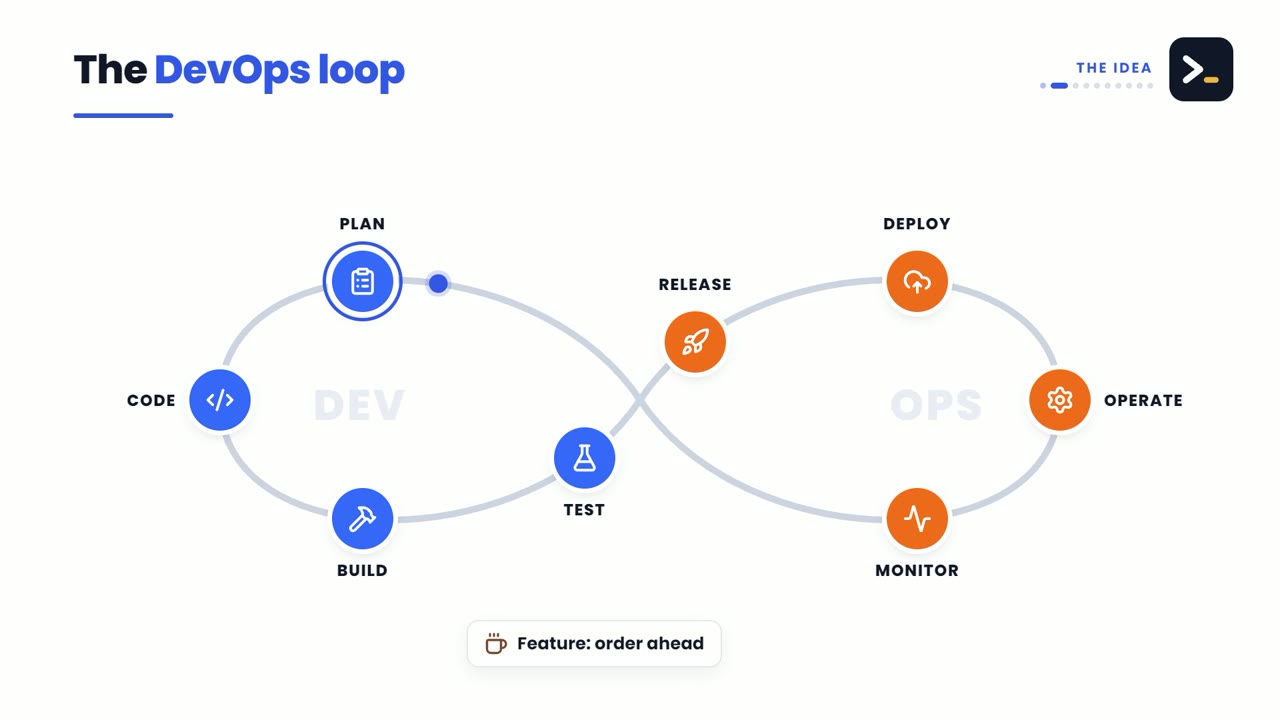
You'll often see it drawn as a loop. Plan, code, build, test, release, deploy, operate, monitor. Then back to plan.
Let's follow our coffee app's new feature through that loop, one step at a time.
Code lives in source control
It starts with source control. The code lives in a shared place, usually Git, hosted on something like GitHub.
Every change is saved with a note about what changed and who changed it.
So you always have a history, and you can always go back.
Branches and pull requests
The developer doesn't change the main code directly. They make a branch, which is basically their own copy to work on.
When they're done, they open a pull request. That's a request to merge their change into the main code.
A teammate reviews it, leaves comments, and approves it.
Continuous integration
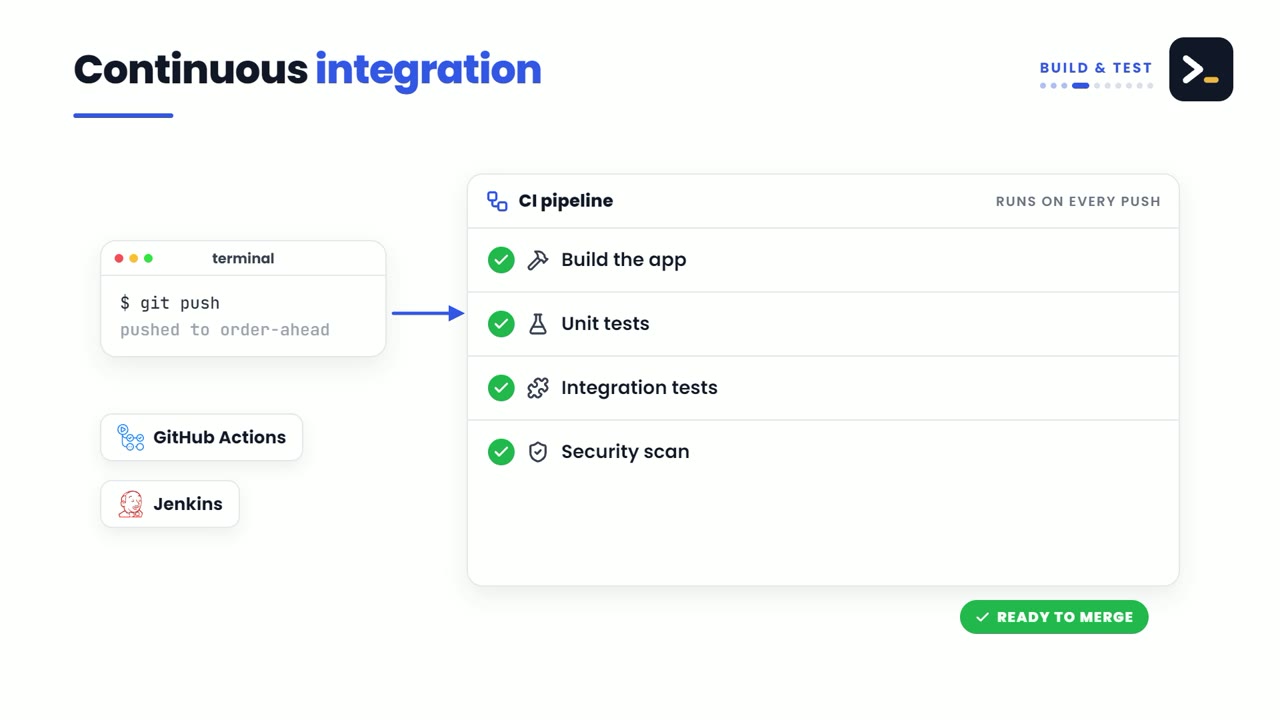
Now comes the first big piece of automation. It's called continuous integration, or CI.
Every time someone pushes code, a CI tool, like GitHub Actions or Jenkins, picks it up automatically.
It builds the app, then runs all the tests. Unit tests check small pieces. Integration tests check that the pieces work together.
Some teams also run a security scan here.
Fail fast, not later
If anything fails, the developer finds out in a few minutes, not a few weeks later.
And the broken change can't be merged. That one rule saves a lot of pain.
Packing it into a container
Remember "it works on my machine"? This step is how teams get rid of that.
Once the tests pass, the app gets packaged into a container, usually with Docker.
A container holds the app plus everything it needs to run. The right versions, the right settings, all in one box.
So the exact same box runs on the developer's laptop, on the test server, and in production.
Images and the registry
That box is called an image. It gets a version number and gets stored in a registry, which is basically a library of these images.
Continuous delivery
Next is continuous delivery. That's the CD in CI and CD.
The pipeline takes that image and deploys it to a staging environment first. That's a copy of the real system where the team can check things safely.
If staging looks good, it goes to production, where real customers are.
Some teams need someone to click approve before this step. Others let it go automatically.
Release a little at a time
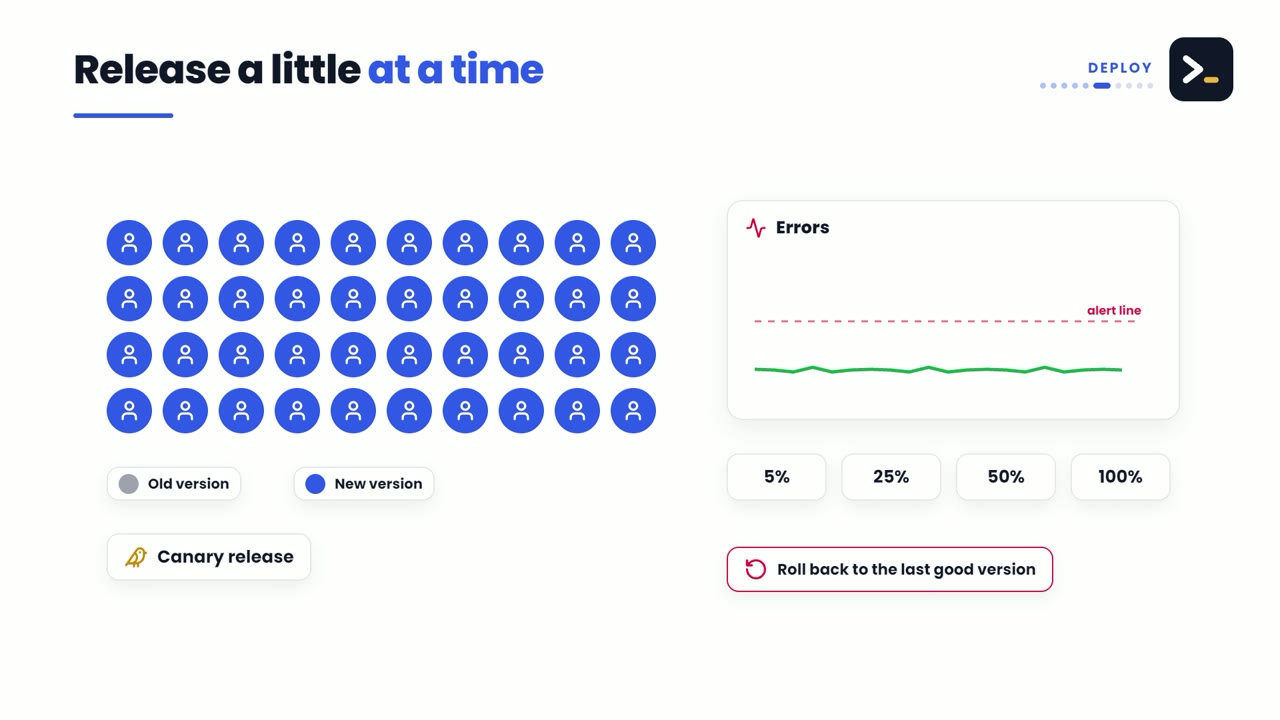
Teams also try not to switch the new version on for everyone at once.
A common way is a canary release. You send maybe five percent of users to the new version, watch what happens, and then slowly move everyone over.
And if something looks wrong, you roll back to the last good version in a few minutes.
Infrastructure as code
So where does all this actually run? On servers, databases, networks. That's the infrastructure.
In the old days, someone would set up a server by hand, clicking through settings. Nobody could remember exactly how it was done.
With DevOps, you describe your infrastructure in code instead. This is called infrastructure as code, and Terraform is a popular tool for it.
You write down what you need, like two servers, one database, and a load balancer, and the tool builds it for you.
The same way, every time. And because it's code, it goes through the same review as everything else.
Running containers with Kubernetes
When you have a lot of containers to run, you need something to manage them. That's what Kubernetes does.
It starts containers, restarts them when they crash, and adds more when traffic goes up.
Like on a Monday morning, when everyone wants coffee at the same time.
Is it actually working?
Now the feature is live. But the job isn't done. You need to know if it's actually working.
That's monitoring. There are three main things to watch.
Metrics, which are numbers over time, like how many orders per minute, or how slow the app is.
Logs, which are records of what the app did.
And traces, which follow one request as it moves through the system.
Tools like Prometheus collect the numbers, and Grafana shows them on dashboards.
Alerts and learning
Then you set up alerts. If errors suddenly jump, someone on call gets a message, even at night.
They fix the issue first. After that, the team writes a short report about what happened, and how to stop it from happening again.
Not to blame anyone. Just to learn.
And whatever they learn goes back into planning. Which takes us back to the start of the loop.
Four numbers that matter
So how do you know if your team is actually getting better at this? There are four numbers that a lot of teams use. They come from a research group called DORA.
One. How often you deploy.
Two. How long it takes for a change to go from code to production.
Three. How often a deployment causes a problem.
And four. How fast you recover when something breaks.
If you manage a team, these four are a good place to start. They tell you a lot more than how many hours people work, or how many lines of code they write.
Putting it all together
So let's put it all together.
A developer writes code and opens a pull request. CI builds and tests it automatically. It gets packaged into a container.
The pipeline deploys it to staging, then to production, a little at a time.
The infrastructure is written as code. And monitoring tells you if it's all working, so you can fix things fast and keep improving.
That’s DevOps
That's DevOps. Small changes, shipped often, with automation doing the risky work, and one team owning the whole thing together.